

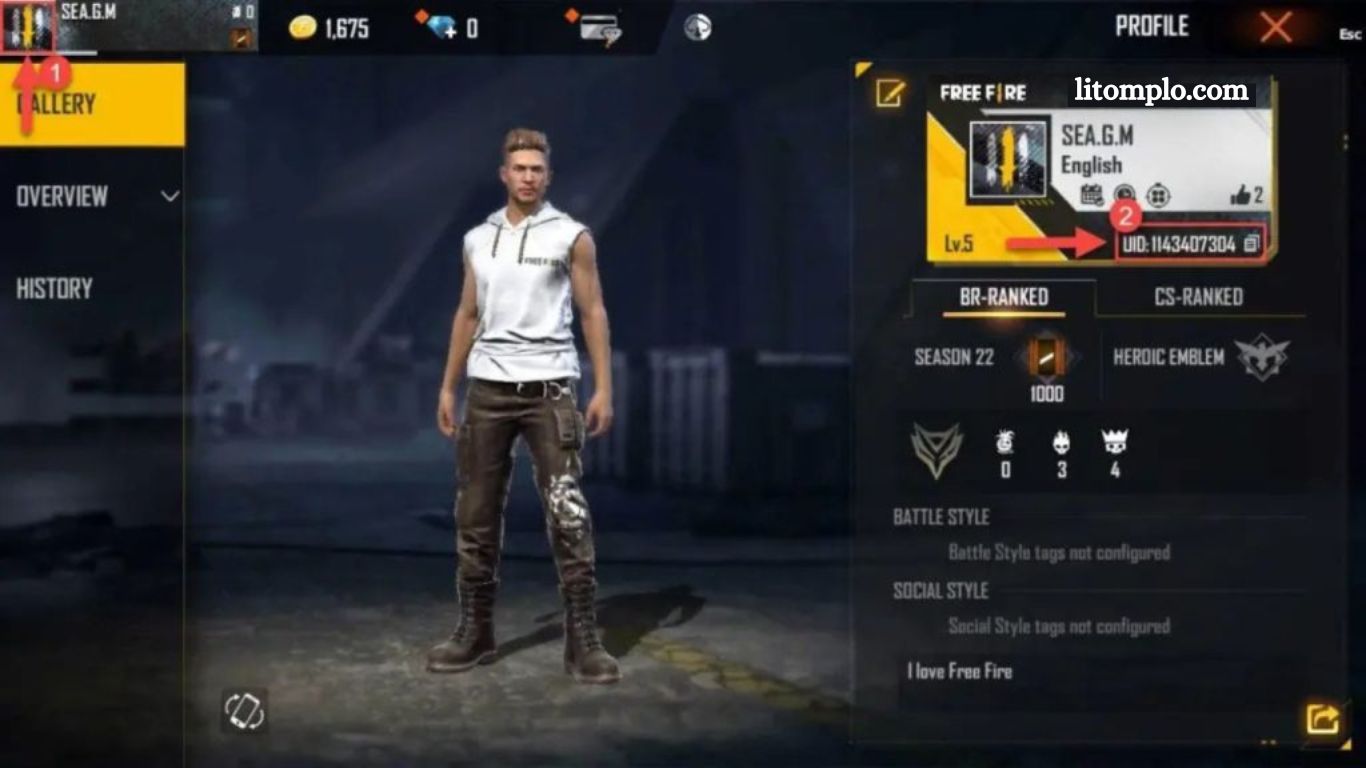
Free Fire UID: How to Locate Your Unique ID QuicklyFree Fire is one of the most popular battle royale games globally, attracting millions of players with its fast-paced gameplay, strategic combat, and immersive survival challenges. In this action-packed world, every player has a unique identifier known as a UID (User ID).
This UID plays a crucial role in managing your account, adding friends, joining custom rooms, and even tracking game progress. Whether you are a newbie or a seasoned player, knowing your Free Fire UID is essential for enhancing your gaming experience. In this guide, we’ll explain what a Free Fire UID is, why it matters, and how to find it quickly across different platforms.
What Is a Free Fire UID?
A Free Fire UID is a unique numerical code assigned to every player when they create an account. Think of it as your account’s fingerprint it’s exclusive to you and cannot be duplicated. This ID is different from your in-game nickname; while you can change your nickname at any time, your UID remains constant throughout your account’s life.
Read More: Irreversible Actions: What to Expect After Deleting Your Free Fire Account
The UID serves multiple purposes:
- Friend Requests: Players can add friends using their UID instead of searching by nickname.
- Custom Rooms: Join or invite players to private matches using their UID.
- Game Support: Customer service uses your UID to identify your account quickly.
- Account Management: Track your progress and recover your account if needed.
In short, the UID is your gateway to a smoother, more connected Free Fire experience.
Why Knowing Your Free Fire UID Is Important
Understanding your Free Fire UID can significantly improve your gameplay experience. Here’s why:
Effortless Friend Connections
Finding friends by nickname can be confusing because many players may have similar names. Using UID ensures you connect with the correct player without mistakes.
Joining Custom Games
Many players host private or clan-based matches. The host often requires your UID to invite you. Without it, joining these events can become difficult.
Account Recovery
In case of account issues like hacking or lost login details, your UID helps customer support identify your account swiftly, ensuring a faster recovery process.
Gifting and Trading
Gifting items or trading in-game resources often requires UID verification to avoid sending items to the wrong player.
By keeping your UID handy, you can save time, reduce confusion, and enjoy a seamless gaming experience.
How to Locate Your Free Fire UID
Finding your Free Fire UID is simple and only takes a few steps. The process varies slightly depending on whether you are using mobile, PC, or a console.
Through Your Profile (Mobile & PC)
- Open Free Fire on your device.
- Tap on your profile avatar located at the top-left corner of the main screen.
- Your UID will appear below your username, usually in a 9-digit numerical format.
- You can copy the UID by tapping the copy button for sharing or future reference.
- This method works on both Android and iOS devices, as well as the PC version through emulators.
Using Game Settings
- Launch Free Fire and go to Settings (gear icon).
- Tap Account or Profile Information.
- Your UID will be displayed alongside your in-game details.
This approach is especially useful if you’re in the middle of a match and can’t access your full profile screen.
From Friend Requests
- Open the Friends tab in Free Fire.
- Tap Add Friend and select Search by UID.
- Your UID can be displayed here for sharing with friends directly.
This method is practical for quickly giving your UID to someone without leaving the Friends section.
Cross-Platform Considerations
If you play Free Fire on multiple devices or platforms, your UID remains the same. It doesn’t change if you switch from mobile to PC or vice versa, making it a reliable identifier across all gameplay environments.
Tips for Managing Your Free Fire UID
Keep It Private
Avoid sharing your UID publicly. While it’s needed for friends and custom rooms, exposing it on forums or social media could invite spam or hacking attempts.
Save It Securely
Store your UID in a secure place like a password manager, note app, or even a screenshot saved offline.
Use for Customer Support
If you face issues like lost items or hacked accounts, providing your UID to Free Fire’s customer service can accelerate resolution.
Double-Check Before Sending Gifts
When gifting items, ensure you use the correct UID to avoid mistakes. Even one wrong digit can send items to another player.
Frequently Asked Questions
What is a Free Fire UID?
A Free Fire UID is a unique 9-digit number assigned to every player. It serves as your account’s permanent identifier for friend requests, custom rooms, and account management.
Can I change my Free Fire UID?
No, the UID is permanent and cannot be changed. Only your in-game nickname can be updated.
How do I find my Free Fire UID?
You can find it in your profile, under Settings → Account, or through the Friends → Add Friend → Search by UID section.
Is my UID the same on all devices?
Yes. Your UID remains the same whether you play on mobile, PC, or any other platform.
Can someone hack my account using my UID?
Not by UID alone. However, sharing it publicly may increase risk, so only share your UID with trusted players or for official purposes.
How is UID used for custom rooms?
Custom room hosts use your UID to invite you to private matches. It ensures you join the correct game without confusion.
What should I do if I lose my account?
Provide your UID to Free Fire customer support. It helps verify ownership and speeds up account recovery.
Conclusion
Your Free Fire UID is more than just a number it’s the key to managing your account, connecting with friends, joining custom rooms, and participating in competitive gameplay. Knowing how to locate and use your UID ensures a seamless and secure gaming experience. By keeping your UID safe, sharing it wisely, and using it strategically, you can enhance every aspect of your Free Fire journey.
